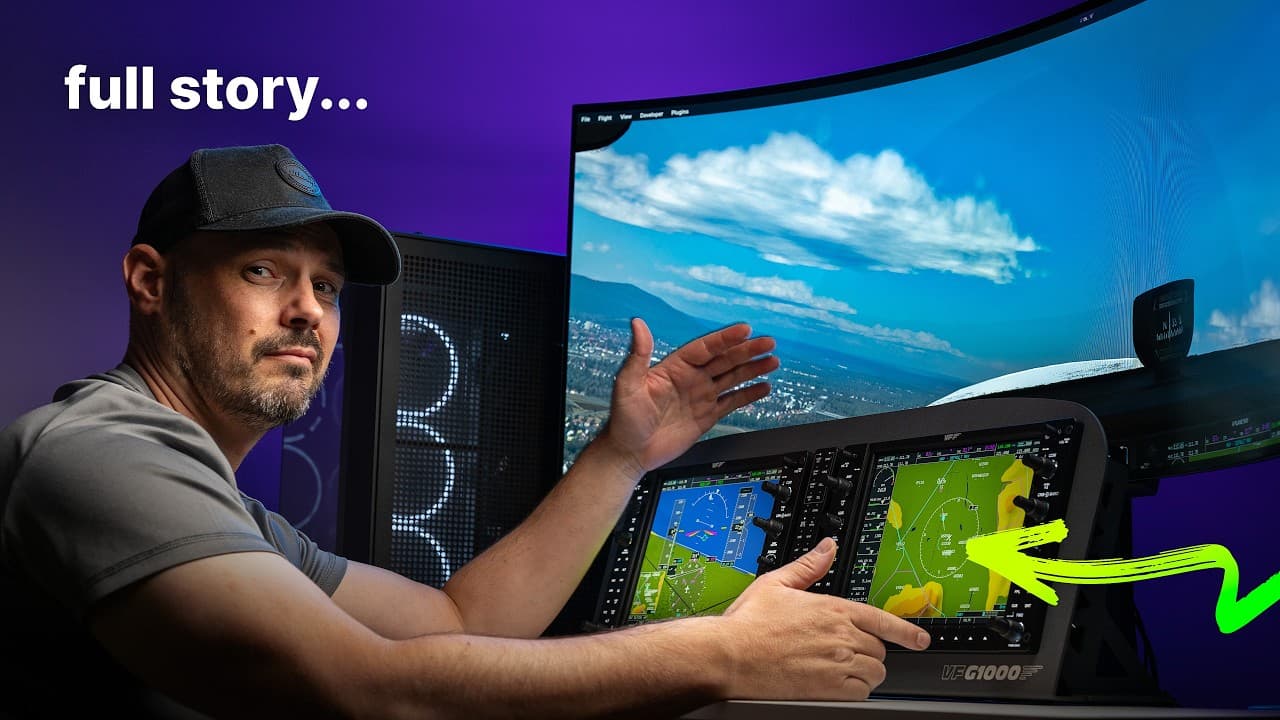
Virtual Fly G1000 Review

Steve | G-LOC MEDIA
Flight simulation enthusiast and YouTuber
The VirtualFly G1000 suite is a premium flight simulation avionics panel built for serious simmers and pilots in training. With exceptional rotary encoder quality, stunning display consistency, and a genuinely simple software setup, it sits at the top end of the G1000 market - but at over $3,200 USD it demands a clear reason to choose it over more affordable alternatives like the FlightSimBuilder.
Pros
- Exceptional rotary encoder quality - close to the real G1000 feel
- Outstanding display viewing angles
- Perfectly consistent backlighting across the entire panel
- Genuinely simple software setup
- Panels slot into the mount with no fuss
- Part of VirtualFly's FAA approved simulator ecosystem
- One software suite if you already own other VirtualFly hardware
Cons
- Plastic buttons rather than rubber on the bottom row and side panels
- Significantly more expensive than competitors like the FlightSimBuilder
- MSFS setup is frustrating due to Pop Out Panel Manager reliability issues
- Screw heads sit slightly above the countersunk holes on the mount making it look slightly unfinished
VirtualFly G1000 Suite Review: Is It Worth the Price?
If you've spent any time building out a serious flight simulator setup, you'll know that an avionics panel is one of those upgrades that completely changes how you interact with your sim. The tactile feedback, knowing exactly where every button is without looking - it adds a layer of immersion that a keyboard or mouse just can't replicate.VirtualFly sent over their full G1000 suite along with the desktop mount, and I've spent some solid time with it across both Microsoft Flight Simulator and X-Plane. Here's everything you need to know.
What's In The Box
The VirtualFly G1000 suite arrives well packaged with plenty of protective foam - typical of VirtualFly's packaging standards. The units are noticeably lighter than they look, which is neither here or there.What you get is the PFD, MFD, and audio panel, along with the all-metal desktop bracket. The bracket itself is a dark grey finish with a VirtualFly G1000 logo on the front. either vinyl or laser engraved, it's hard to tell. Either way it looks sharp.
One thing worth noting before you buy — the G1000 units are fairly wide or thick compared to some alternatives. If you're not using the VirtualFly stand and plan to mount them into your own cockpit build, double check the measurements on their website before ordering.
Build Quality and First Impressions
This is where VirtualFly has clearly invested most of their effort and it shows immediately.Rotary Encoders
The rotary encoders are the standout feature. They're stiff, deliberate, and consistent across every knob on the unit. There's very little play in the rotary action and the clickable function on each encoder is satisfying and precise. From what I can recall from handling a real G1000, these feel remarkably close to the genuine article.Display Quality
The display is matte, not glossy, which is exactly what you want in a sim environment with backlighting and ambient light sources. Viewing angles are exceptional - there's very little colour washout no matter what angle you're looking down at the panels. The backlighting is also completely consistent across the entire unit, which is something I've noticed as an issue on competing products at lower price points.The screens run at 1024x768 and default to 60hz, though you can push them to 75hz. For a G1000, 60hz is more than adequate.
Buttons
Here's where there's a minor difference worth mentioning. The buttons along the bottom row and sides of the panels are plastic rather than rubber. Comparing them directly to the FlightSimBuilder G1000, I actually prefer the feel of the rubber buttons on the FlightSimBuilder. However, the VirtualFly buttons do exactly the same job and the click is positive, but if button feel is something you're particular about, it's worth being aware of.The Mount
The metal desktop bracket is solid once the G1000 panels are locked in. There's a slight flex in the middle section when it's empty, but once the panels are mounted and secured that flex almost completely disappears. The rubber feet on the base keep it stable on a desk and there are also screw holes if you want to permanently mount it. The G1000 panels themselves slot into the frame like they were made for it - which of course they were.Software Setup
VirtualFly's software is genuinely simple. Download, install, connect via USB and you're done. The dashboard shows your PFD, MFD and audio panel connection states, gives you basic backlight controls, and that's largely it. There's not a lot to configure and that's a feature, not a limitation.One important note - the VirtualFly software must be running before you launch your simulator.
X-Plane Setup
X-Plane handles this setup beautifully. Go into the graphics panel, select monitor 1, change it from unused to G1000 PFD pilot, then assign monitor 2 as MFD. That's it. Once configured, every time you load into a compatible aircraft the displays just appear. No popping out panels, no fussing around. X-Plane's native multi-monitor support makes this an absolute pleasure to use.Input lag is essentially undetectable. The responsiveness of the rotary knobs and buttons is immediate.
Microsoft Flight Simulator Setup
This is a different story and it has nothing to do with VirtualFly. MSFS requires you to either manually pop out the PFD and MFD panels and drag them to your screens, or use the Pop Out Panel Manager plugin to automate it.The manual method works but gets tedious quickly. Pop Out Panel Manager is supposed to automate the process but it's unreliable - screen flickering, black bars appearing on the panels, inconsistent behaviour across sessions. This has been a recurring issue with MSFS since 2020 and it's a Microsoft problem, not a VirtualFly one.
Once you push through the setup headaches, the actual flying experience in MSFS is comparable to X-Plane. Input lag is minimal, everything maps correctly, and it works well. Getting there is just more painful than it should be.
Price and Value
The VirtualFly G1000 suite sits at just over $3,200 USD. To put that in context, the FlightSim Builder G1000 comes in at around $1,750 USD — a difference of roughly $1,500. The VirtualFly is not the best value on the market. That crown goes to the FlightSimBuilder. But value and the right product for your situation are two different questions.Who Is This Actually For?
If you're a real pilot or training toward a licence, the VirtualFly G1000 suite makes a strong case for itself. It's part of an FAA approved simulator setup in the US, the hardware is as close to the real thing as you'll find at this price, and plug and play simplicity means you're flying rather than troubleshooting.If you're a sim enthusiast who isn't a pilot and has no plans to become one, there are four reasons you might still justify the extra spend - you care deeply about rotary encoder feel, plug and play is non-negotiable, you're already running VirtualFly hardware and want everything under one software roof, or you simply want the best backlighting available on a G1000 panel.
If none of those four things apply to you, the FlightSimBuilder G1000 is the smarter buy. It delivers a great experience at a significantly lower price point, and if you want additional features, the TNXI version expands the range of compatible aircraft as well.
The VirtualFly G1000 suite is an excellent product. Whether it's the right product for you comes down to what you're building and why.
Affiliate Disclosure: Some links on this page are affiliate links. If you click and make a purchase, I may earn a small commission at no extra cost to you. I only recommend products I personally believe in.