Velocity-flight-deck-review

Steve | G-LOC MEDIA
Flight simulation enthusiast and YouTuber
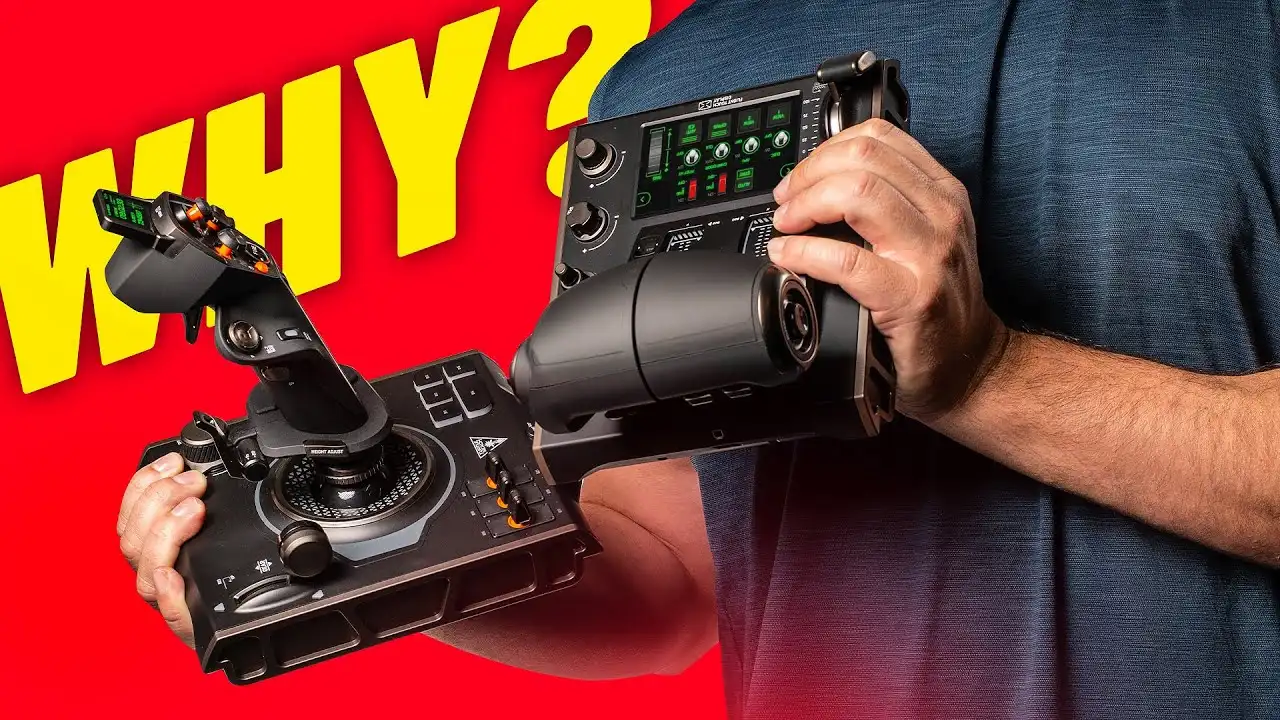
The Turtle Beach Velocity One Flight Deck packs an enormous amount of features into a $370 all-in-one HOTAS package - a smooth weighted throttle, touch display with custom button mapping, adjustable stick length, and build quality that genuinely punches above its price. The stick has a more pronounced centre detent than I'd like at this price point and two switches on my unit felt loose, but neither meaningfully hurts the flying experience. If you want a highly configurable, feature-rich HOTAS that sits just below the high-end bracket without the high-end price this is worth serious consideration.
Pros
- Comes with both throttle and stick, everything you need straight out of the box
- Throttle feel is smooth, weighted and genuinely excellent
- Hall Effect sensor for accurate and long lasting throttle input
- Touch display is a genuinely useful and unique addition at this price
- Custom button mapping on the touch display turns it into a built in mini button box
- Enormous number of buttons, switches, dials and hat switches across both units
- Adjustable stick length to suit different hand sizes
- Deep and configurable software with profile saving per aircraft
- Both bases have mounting holes for hard mounting
- Adjustable backlighting including the ability to tone it right down
Cons
- Centre detent on the stick is more pronounced than expected at this price
- eft to right axis has a noticeably harsher detent than front to back
- Two switches on the stick base felt loose out of the box
- Touch display lags slightly at times and colours wash out at an angle
- Haptic detents feel more like vibration than true haptic feedback
- Mouse mode on the stick needs refinement
- Touch display not practical in VR
Turtle Beach Velocity One Flight Deck Review - Is It Worth $370?
The Turtle Beach Velocity One Flight Deck has been out for a few months and people keep buying it. At $370 it sits in an interesting spot — not budget, not top tier, but somewhere in between with a feature list that makes it hard to ignore. Turtle Beach sent this unit for review but as always everything here is my own take.
What You Get for $370
The Flight Deck comes with both the throttle and the stick — everything you need to get flying straight out of the box. That alone makes the price feel more reasonable when you consider what you'd spend buying a throttle and stick separately from other brands at this level.
The Throttle
The throttle is genuinely one of the highlights of this whole package. The movement is stunning — smooth, accurate, and with a satisfying weight to it that makes precise inputs easy. There's a good amount of throw which aids accuracy, no play whatsoever, and the buttons, dials, and switches are all positioned well for average to larger hands.Hall Effect Sensor
The throttle uses a Hall Effect sensor rather than contact points, meaning it uses magnets to determine position. It's a more accurate and longer-lasting approach and while it's not unique to this product it's reassuring to see at this price point.Haptic Detents
One of the more interesting features is the haptic detents which can be adjusted via the touchscreen display. The idea is great and it works reasonably well, but it feels more like a vibration effect than true haptic feedback — a little muddy rather than the crisp tactile response you might hope for. Good concept, not quite fully realised yet.Touch Display
There's a small touchscreen display on the throttle and it's a genuinely useful addition. Firmware updates, lighting, profiles for multiple aircraft — it's all in there. The screen itself is sharp but it does lag at times, and the colours wash out a bit when viewed from an angle. In VR it's probably not very usable, but for traditional sim use it's a real asset. The best thing about it is the ability to customise your own buttons on the display — essentially giving you a mini button box built right into the throttle. That's an absolute masterstroke and one of the standout features of the whole unit.Other Throttle Controls
The throttle is covered in buttons, switches, and dials. There's a fire button that works brilliantly as chaff and flare in DCS, a split throttle function via a button on the side, hat switches, and a rotary dial. It's genuinely feature-rich.The Stick
The stick is well designed ergonomically and packed with controls. You get a gear lever with a satisfying click at both ends, a three-position rotary switch, a brake lever, missile release, hat switches, a trim wheel which is excellent, and an adjustable grip length - push a button, slide the grip up or down to suit your hand size. It's not a massive range of adjustment but you really don't need much to make a meaningful difference.There's also a mouse mode activated by an orange button on the stick. It's a neat idea but not the smoothest in implementation - feels like it has real potential that software updates could unlock over time.
Yaw and rudder twist control is included for anyone flying without a set of rudder pedals, with a decent amount of twist travel. It can also be switched off digitally in the software if you already have rudders — though the stick will still physically rotate, it just won't feed into the sim.
The Detent
This is the main point of contention. There's a fairly large detent across the centre of both the X and Y axes. Most low to mid-tier sticks have this but at $370 I was hoping for something more muted. The left-to-right axis has a noticeably harsher detent than front-to-back. It doesn't ruin the flying experience — I flew with it extensively and it didn't bother me as much in actual use as I expected — but if a smooth, refined centre transition is a priority for you this is worth knowing going in.The spring tension also feels a touch strong and the stick snaps back to centre quite quickly. Again very personal, but a slightly lighter spring would have been my preference.
A Quality Issue Worth Noting
Two of the switches on the front of the stick base felt loose on my unit — only the centre two-way switch felt completely solid. It's worth flagging in the comments if you've experienced the same as it may or may not be a widespread issue. Nothing a little super glue wouldn't fix but not what you want to find on a $370 peripheral.Build Quality
Overall the build quality genuinely impresses. The high quality matte plastic finish, the soft touch finish on the stick itself, and the rotary knobs all punch well above what the price would suggest. Turtle Beach have done a fantastic job here - it looks great even up close and the materials feel premium throughout.Both bases have a decent amount of heft to them which helps them stay put during use, and both have mounting holes on the bottom for hard mounting to a cockpit or desk. You can also change the backlighting colour on the bases which is a nice touch - and importantly you can tone it down if you're not a fan of the full brightness RGB look. The loose switches aside, the build quality is one of the strongest arguments for this product.
Software
Initial setup had some hiccups — the firmware update process caused the base and stick to fail to fully light up and power on. To Turtle Beach's credit the instructions on the website for getting into bootloader mode were clear and the fix was quick once found.The software itself is well laid out and impressively deep. Deflection, haptics, sensitivity of scroll wheels, profiles per aircraft or sim - it's all configurable. New simmers may feel overwhelmed at first but take your time and it's worth learning.
One thing that felt slightly odd - profiles for the throttle and the stick are created and loaded separately. If you want to switch profiles you need to load each one individually. It might just be my experience but it felt like something that could be streamlined.
The touchscreen button customisation is the software highlight. Being able to map your own buttons to the display turns it into a proper mini button box and adds a layer of functionality you simply don't get elsewhere at this price.
Who Is the Turtle Beach Velocity One Flight Deck For?
Buy it if:
- You're stepping up from a budget HOTAS and want a meaningful jump in build quality and features
- You fly a variety of flight sims and space sims and need a large number of inputs
- You love to customise and want deep software control over your setup
- The touch display and button customisation genuinely appeal to you
- A slightly stronger centre detent isn't a dealbreaker
Look elsewhere if:
A smooth, muted centre detent on the stick is a top priority - you'll need to spend more money and accept losing some of the unique features
You're flying primarily in VR - the touch display loses a lot of its value there
You want a pure combat stick feel without compromise - something from Virpil or Thrustmaster's higher-end range would suit better
Final Verdict
Turtle Beach have created a genuinely impressive all-in-one HOTAS package at $370. The throttle is butter smooth, the feature count is enormous, the build quality punches above its price, and the touch display with custom button mapping is a standout addition that sets this apart from the competition at this level.The stick detent and the loose switches are real points to acknowledge, but neither ruins the flying experience. For anyone who values a highly configurable, feature-rich HOTAS that sits just below the high-end stuff without the high-end price tag, the Velocity One Flight Deck is a strong option and the price feels fair for what you get.
Affiliate Disclosure: Some links on this page are affiliate links. If you click and make a purchase, I may earn a small commission at no extra cost to you. I only recommend products I personally believe in.