Thrustmaster TQS Review

Steve | G-LOC MEDIA
Flight simulation enthusiast and YouTuber
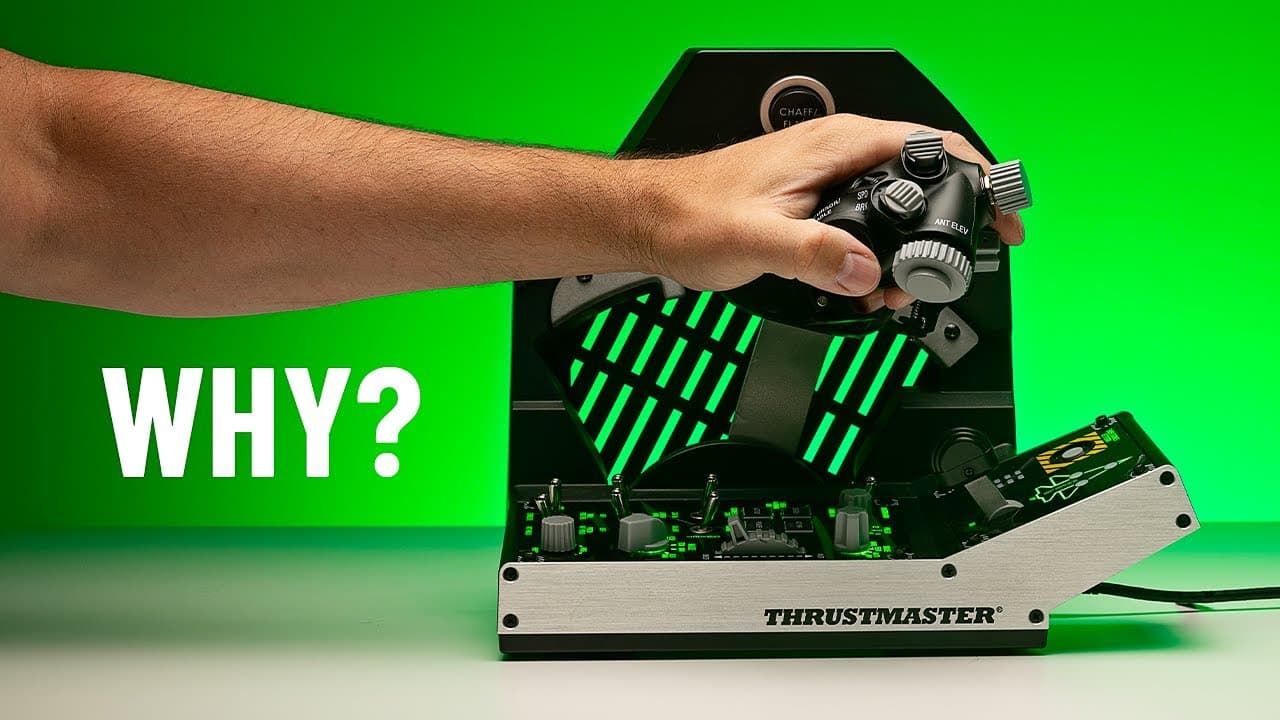
The Thrustmaster TQS Mission Pack is a 1:1 F-16 replica throttle system that comes in at just under $500 as a bundle, and the throttle itself is genuinely one of the smoothest I've ever put my hands on, it even edges out the WinWing F-16 throttle for feel. The Viper Panel is a solid addition but has a couple of sore spots, particularly the cheap-feeling gear lever and the landing gear indicator lights that don't work out of the box without a community script. If you're flying the F-16 in DCS the majority of the time, this is a brilliant buy, but if you jump between aircraft it's probably too specialised.
Pros
- Fantastic throttle feel with tension adjustment
- Great build quality overall
- Perfect replica for F-16 fans
- Chaff/flare button is a brilliant touch
Cons
- Gear lever feels like an afterthought
- Gear lights don’t work without a script
- Less plug-and-play than advertised
- Very F-16 specific—less ideal for general simming
What Is the TQS Mission Pack?
There are a lot of throttles out there for flight sim users, but the Thrustmaster TQS Mission Pack stands out thanks to its F-16 replica design and strong reviews. But is it really as good as it looks? In this post, we’ll take a closer look, test it out, and share what works well—and what could be better.
The TQS Mission Pack is a two-part system designed to replicate the throttle of a real F-16 fighter jet. It includes:
- The TQS Viper Throttle
- The Viper Panel (a button box with additional controls)
You can buy both as a bundle for just under $500 USD, or separately: $349 for the throttle and $249 for the panel. If you buy the full pack, you’ll save about $100.
This setup is aimed squarely at sim pilots who spend most of their time flying the F-16, especially in DCS World.
Design and Features – A Realistic F-16 Replica
This is a 1:1 replica of the real F-16 throttle, and Thrustmaster has done an excellent job nailing the details. They even added a few extra switches, like:
- A push switch on the antenna elevation knob
- A toggle switch under the throttle handle
These additions don’t ruin the design—they actually blend in nicely. While some users say the under-throttle switch interferes with ergonomics, I got used to it quickly and even preferred having it there.
There’s also a rocker switch near the speed brake that’s meant for zooming your VR view. It’s a little awkward to use in VR, so I ended up using a different axis on the panel for zooming instead.
Throttle Performance – Incredibly Smooth
Thrustmaster claims the throttle offers “thrilling and smooth travel” thanks to its metal bearings and Legacy AIS rail, and honestly—it lives up to the hype.- The throttle motion is silky smooth
- There’s a tension adjuster on the back to get the feel just right
- You get authentic idle cutoff and afterburner detents using mechanical levers
I’ve never flown a real F-16, but this is easily one of the smoothest throttles I’ve ever tested. It even edges out the Winwing F-16 throttle in terms of overall feel.
Build Quality – Mostly Excellent
The TQS Viper Throttle is made from a mix of materials:- Aluminium handle and throttle rail
- High-quality plastic housing and switches
The buttons and switches feel solid overall, though the dogfight and speed brake switches are a little loose. Still, they don’t feel cheap.
A standout feature is the chaff/flare button built into the throttle. It’s incredibly satisfying to use—but to get the most out of it, you’ll want to hard-mount the unit. Otherwise, the base might wobble if you press it too firmly.
Viper Panel – Decent but Not Perfect
The Viper Panel (the lower portion) adds even more control options:- Landing gear
- Master arm
- Stores configuration
- Autopilot functions
- Toggle switches like on the Warthog
Most of it is made from plastic, except for some metal toggle switches and a metal side plate. It doesn’t feel as solid as the Warthog HOTAS, but it still holds up well.
However, there are two key drawbacks:
- The gear lever feels cheap – It’s small, plasticky, and doesn’t match the rest of the build quality.
- Landing gear indicator lights didn’t work out of the box – You need to use a community-created LEIS script to sync DCS with the lights. It works, but it’s extra setup that many users won’t expect.
Link to the script here
What Do Other Users Say?
Looking at Amazon reviews, the TQS Mission Pack scores about 4.2 out of 5 stars. Here are some highlights:- Feels like the actual F-16 throttle” – From someone who worked on F-16 jets
- Amazing throttle – worth every penny”
- Landing gear lights don’t work” – A common complaint, but solvable with a script
- Gear lever feels cheap” – We agree on that point
Overall, reviews are mostly positive, with the biggest criticisms focused on the panel rather than the throttle itself.
Who Is This For?
If you mostly fly the F-16, this is an excellent buy. The throttle axis is unmatched in smoothness, and the replica design is spot-on. It’s immersive, fun to use, and well-built.But if you fly a variety of aircraft, this setup might feel too specific. It’s designed for the F-16, and while you can use it for other planes, it won’t feel as natural or versatile as a more generic throttle system.
Final Verdict – Great for F-16 Pilots
The Thrustmaster TQS Mission Pack delivers a top-tier throttle experience with just a few rough edges. The throttle itself is superb, and the panel is solid despite a couple of design quirks.If you fly the F-16 70–80% of the time in DCS or other sims, this is a no-brainer. But for those who fly a broader mix of aircraft, you might want to consider a more flexible throttle option.
Affiliate Disclosure: Some links on this page are affiliate links. If you click and make a purchase, I may earn a small commission at no extra cost to you. I only recommend products I personally believe in.