T.Flight HOTAS Review

Steve | G-LOC MEDIA
Flight simulation enthusiast and YouTuber
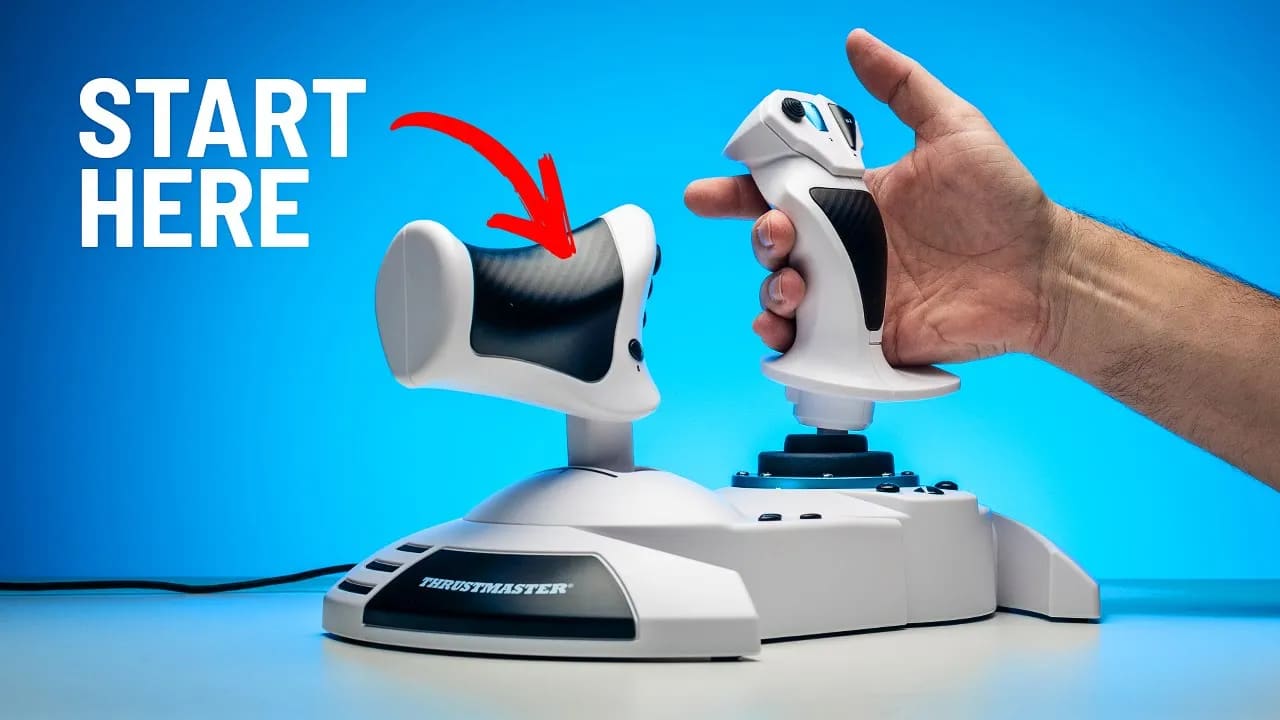
The Thrustmaster T.Flight is the best beginner flight sim controller available at $100 - a complete HOTAS package with everything a new simmer needs to get flying across GA, commercial, and military aircraft without spending a fortune before knowing which direction they want to go. The build quality is what you'd expect at this price and the white finish won't stay clean forever, but as a low-risk entry point that helps you make smarter upgrade decisions down the line it genuinely earns its place. Start here, figure out what you love, then spend your money with purpose.
Pros
- Only $100, the lowest risk entry point into flight sim hardware
- Complete HOTAS package, everything you need to get flying straight away
- Two rudder input options, throttle rocker or stick twist
- Twist grip can be locked off if you prefer the rocker
- Solid stability on the desk especially when both parts are connected
- Rubber pads do a great job of keeping it planted
- Smooth feel on both the stick and throttle axis
- Tension adjustment on the stick is a nice touch
- Xbox and PC compatible
- Helps you figure out your flight sim direction before spending serious money
Cons
- White finish likely to discolour and go yellow over time
- Throttle feels a little light and could do with more weight
- Design looks dated, it's an older product in new branding
- No grip size adjustment, larger hands may find it limiting
- Base can move slightly under rough inputs when separated
- Will likely end up unused once you upgrade, but that's by design
Best Beginner Flight Sim Controller - Why the Thrustmaster T.Flight Could Save You Thousands
If you're new to flight simulation you're probably staring at a wall of gear completely confused. Either you think you need to drop one, three, maybe even five thousand dollars just to get started, or it all just looks too hard and you've no idea where to begin. I get it. People are talking about throttles, yokes, avionics, cockpits, rudders, and setups that cost as much as a family car.Then there's this. The Thrustmaster T.Flight Microsoft Flight Simulator Edition. At around $100 this stick and throttle combo is not just good enough to get you started — it could genuinely save you thousands of dollars in the long run. Here's why.
What You Get for $100
Let's run through the features quickly. The T.Flight comes as a combined stick and throttle - a HOTAS setup - that covers everything a new simmer needs to get flying.Controls and inputs:
- 14 buttons plus trigger and hat switch
- Hat switch preset for view control - left looks left, right looks right
- Two ways to control rudder input - throttle rocker or stick twist
- 10-bit precision on the stick - nothing special but absolutely adequate
- Mild detent at 50% on the throttle, likely for Airbus climb gate
- Tension adjustment knob on the underside
- Cable routing on the underside to keep things tidy
- Connection port at the front for attaching T.Flight rudders if needed
Compatibility:
Xbox and PC compatible — worth knowing if you're not exclusively on PC.The two rudder control options are worth highlighting. The throttle rocker is the better of the two for most people. With twist grip sticks it's easy to make inadvertent rudder inputs without realising — the rocker on the throttle eliminates that problem. You can also lock off the twist grip entirely by tightening a screw underneath if you want to commit fully to the rocker.
The two parts can be detached and used separately, connected by a cable across the desk. Honestly most people will just keep them connected — it works better that way and feels more solid as a combined unit.
Build Quality and Feel
Let's be straight - this is a budget product sitting at the lower end of the flight sim peripheral market. That context matters. With that in mind the T.Flight actually feels pretty good. The stick is smooth, the throttle is smooth, and the pitch axis detent is muted enough not to be annoying.The throttle is a little on the light side - it could do with a touch more weight - but that's being especially harsh at this price point. It's not something that will ruin your experience, particularly when you're just starting out.
Stability is solid. When both parts are connected and you've got both hands on the HOTAS it stays very well planted on the desk. The rubber pads on the bottom do a genuinely good job. When separated the pitch axis on the base can move slightly under rough inputs but this is common across all low to mid-tier sticks on a desk, and if you're flying commercial or GA aircraft it simply won't be an issue.
Ergonomics:
Tested with 9.5 inch hands - both the grip and the throttle feel well-sized. No grip size adjustment available though, so if your hands are significantly larger than average it's worth thinking about before buying.Design:
It looks a little dated and that's because it is - this is a branded version of the older T.Flight that's been around for years. There's nothing inherently wrong with it but it doesn't look modern. The white finish is also a concern for longevity - how long before it starts going that grotty yellow colour is a fair question.Why the T.Flight Could Be the Best Beginner Flight Sim Controller Purchase You Ever Make
Here's the real point of this whole review and it's something I feel strongly about.As a new flight simmer the options are endless and the rabbit hole is deep. What happens to most people is one of two things - they either get bored and give up, or they fall completely in love with flight simulation. If you bought the T.Flight and got bored you've only lost $100. If you fall in love with the hobby, this little stick will pay for itself ten times over.
Here's why. As you start to progress most simmers eventually find themselves drawn in a specific direction. Break it down simply and it's GA flying, helicopters, military aircraft, or commercial jets. Many people go even further and dial right down to a specific aircraft type. This is where I see so many new simmers making expensive purchasing mistakes.
People see fully built cockpit setups and go all out from the beginning, spending thousands, only to discover their interest has taken them somewhere completely different and the gear they bought doesn't suit where they've ended up. A yoke setup for someone who ends up loving DCS. A full military HOTAS for someone who just wants to fly the Cessna 172. You get the idea.
The T.Flight gets you deep enough into flight simulation to genuinely figure out which direction your interest is heading. After spending real time with it across different aircraft types and simulators, you'll make much more educated and purposeful buying decisions when it's time to upgrade. That's worth far more than the $100 it costs.
Who Is the Thrustmaster T.Flight For?
Buy it if:
- You're completely new to flight simulation and don't know where to start
- You want to explore everything flight sim has to offer before committing to expensive gear
- You're on a tight budget and want the best beginner flight sim controller available at this price
- You fly on Xbox as well as PC
- You want something simple, plug and play, with no configuration headaches
Look elsewhere if:
- You already know you love flight sim and have a clear direction in mind - invest in something more suited to your specific interest
- Your hands are significantly larger than average - no grip size adjustment available
- You're committed to aggressive military flying - the stability under rough inputs on a desk has limits
Final Verdict
The Thrustmaster T.Flight is a truly one-and-done approach for beginners. It takes all the confusion out of buying flight sim gear, gives you a genuinely solid entry point, and lets you develop a real understanding of the landscape before you make any expensive purchasing decisions.Will it end up at the back of a cupboard after a year or two? Probably. But not before it's done its job. As a new flight simmer the smartest thing you can do is avoid expensive mistakes, start with something like this, figure out what you love, and then upgrade with purpose.
At $100 it is genuinely the best beginner flight sim controller you can buy right now.
Frequently Asked Questions
Affiliate Disclosure: Some links on this page are affiliate links. If you click and make a purchase, I may earn a small commission at no extra cost to you. I only recommend products I personally believe in.