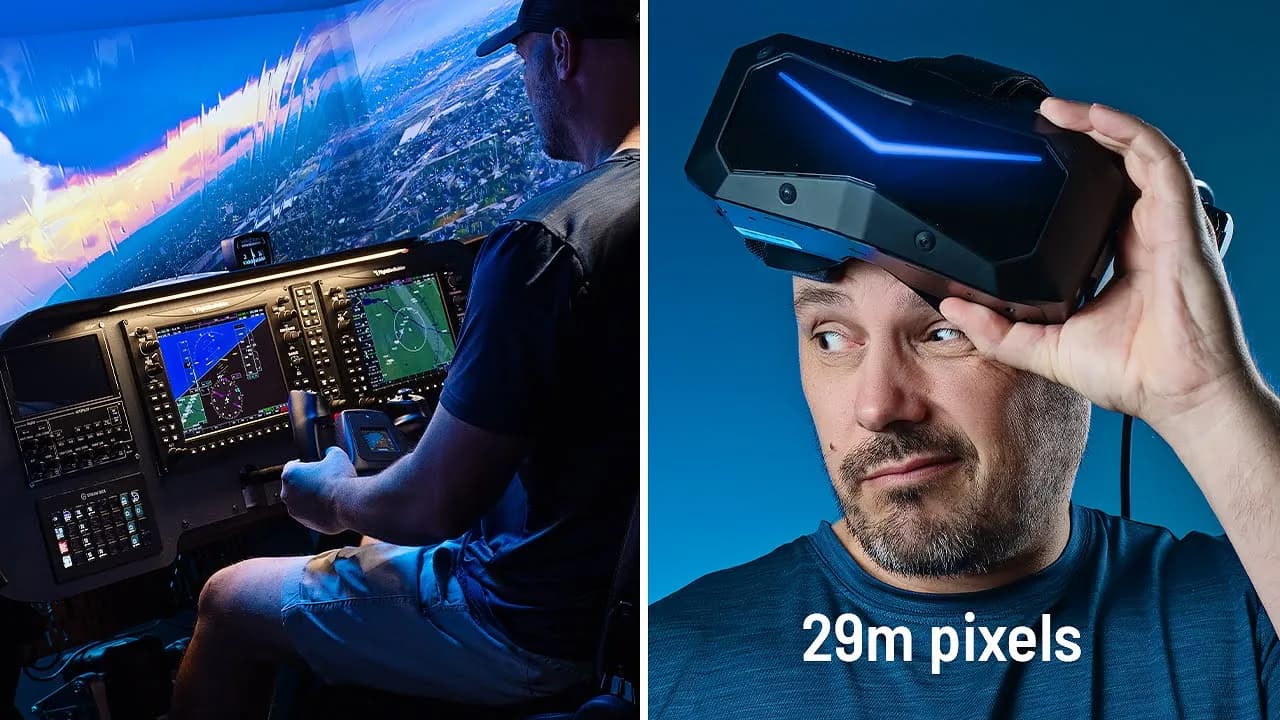
Pimax Crystal Super vs Triple Screens

Steve | G-LOC MEDIA
Flight simulation enthusiast and YouTuber
The Pimax Crystal Super is the first VR headset that's genuinely made me question whether triples are still the king of flight sim. The resolution boost is massive, the depth perception is something screens simply cannot replicate, and at $1,700 it costs less than half of a comparable triple OLED setup. That said, you need a seriously powerful PC to drive it properly, and for long sessions with a dedicated physical cockpit build, triple screens still edge it out on comfort and convenience. But the gap has never been smaller, and where VR is heading from here is genuinely exciting.
Pimax Crystal Super vs My Triple 48″ OLED Setup
I’ve been saying for years that VR just can’t compete with big triple displays for flight simulation. Well, I might be about to eat my words. This VR headset has completely changed my perspective, and it’s got me questioning everything I’ve been banging on about.
This is the Pimax Crystal Super versus my triple 48-inch OLED setup. If you’ve seen my other VR videos, specifically the Pimax Crystal and Crystal Light reviews, you know I’ve been pretty skeptical about VR flight simulation. But something’s different this time.
Fair play to Pimax for sending this out for testing as a loaner – I’m sure they watched my previous videos and thought, “Why are we sending this guy a VR headset?” But here we are.
What We’ll Cover in This Review
- Key differences from the Crystal Light
- The beast of a PC you’ll actually need to run this thing
- How it stacks up against this triple OLED monster setup in terms of cost, usability, and real-world performance
Key Differences from the Pimax Crystal Light
Design and Comfort Updates
The Pimax Crystal Super has a mildly updated design with a smaller form factor, but it’s actually heavier than the Crystal Light. However, the comfort is improved, especially the weight distribution over the bridge of my nose – though that’s highly subjective and will vary person to person.In terms of build quality, it’s actually the exact same as the Crystal Light, and that’s a bit of a letdown when you consider this headset costs $1,700 USD compared to the Crystal Light at $850. That’s literally twice the price with the same materials and build quality, but I suppose you’ve got all the magic happening internally.
Audio Improvements
The version they sent me had the extra DMAS speakers, which are a massive improvement over the originals. But I need to be clear – they’re still nowhere close to what a mid-range set of gaming headphones will deliver.Prescription Lens Integration
I’m also using HonsVR prescription lenses, which were provided by HonsVR. I’ve used these before and the prescription came out spot on again. These ones have a blue light filter and are magnetic, so they’re easy to get on and off the headset.Tip: If you wear glasses, just get lenses. The difference in comfort is night and day, and you won’t have to worry about your glasses fogging up or getting scratched inside the headset.
Technical Specifications and Performance Requirements
What You Need to Run the Crystal Super
This review was conducted on a powerful PC running an RTX 5090 and a 7800X3D – essentially a Lamborghini of gaming PCs. Why do these specs matter?You’ll need something with real grunt to get what I would say is just a reasonable experience with a headset like this. Anything less than an RTX 4080 and a high-end CPU with a well-tuned machine, I’d be thinking twice.
Resolution and Visual Quality
The first thing I noticed right away was the extra field of view. I don’t know if it’s as crazy an upgrade as some people claim, but it’s definitely noticeable compared to the Crystal Light and the likes of a Meta Quest.This was something that previously was a major issue for me with VR – I missed all that peripheral vision that you get with triple displays (almost 180 degrees). The extra FOV in the headset is great, it really is, but large triple displays won’t be beaten. I think the day is getting closer, but we’re not quite there yet.
The Game-Changing Resolution Boost
Reading Cockpit Instruments
The next major point – and this is huge for me, definitely a tipping point – is that I could actually read the gauges and buttons on the G1000 while in the cockpit. Even most of the smaller ones, because in the Crystal Light, I couldn’t read all of them.The massive boost in resolution gives crazy levels of detail. Is it as detailed and crisp as a triple 4K display? No. Is it far off? Also, no.
I reckon I can read at least 85-90% (maybe even more) of what’s on the G1000, compared to maybe 60-70% on the Crystal Light. In terms of VR, that’s now at a level that I would consider highly usable for someone who really wants to get technical with the avionics and instruments.
Performance Compromises
The significant downside of the high resolution is the power it takes to drive it. I was hoping the VR headset might be easier to run, but even on the RTX 5090 system, I had to turn down quite a lot of the settings just to get that super silky smooth performance.You need to run close to native resolution to really see that detail, and it’s doable, but graphical compromises need to be made in a lot of places.
What VR Does Better: Depth Perception and Immersion
The Depth Perception Advantage
Here’s something that’s impossible to achieve with screens or a triple display: depth perception. This is incredible. If you’re at 2,000 feet, you feel like you’re at 2,000 feet. At this resolution, it can literally take your breath away.The resolution in the Super creates such a superb experience. If you want to feel like you’re actually in the cockpit at altitude, VR is the only way to do it. Triple screens, no matter how good they are, will just never deliver this feeling or even get close.
VR Setup Strategy: Changing My Approach
Initially, being able to reach for my physical controls without looking felt impossible in VR. Anything other than the yoke and throttles, I just couldn’t master it. But that’s when I realized my approach needed to change completely.The Winning VR Strategy
VR, particularly the Pimax Crystal Super, became amazing when I embraced just the basic physical controls like: Yoke, Rudder and Throttle.Then interacting with everything else through the clickable cockpit, primarily using the mouse.
Once I accepted that was going to be my primary interaction with the cockpit, I genuinely had a great time flying. Landing challenges, activities, flying all different aircraft types, and learning where all the buttons and controls of various cockpits are – that’s something a single physical setup just can’t give me because I’m so constrained.
Cost Comparison: VR vs Triple Display Setup
Breaking Down the Numbers
Looking at the overall cost, VR replaces the monitors, G1000s, and Stream Deck in my setup:Physical Setup Costs:
- G1000s: $1,900
- 32-key Stream Deck: $150
- Triple 48″ OLEDs: $1,200
- Total: $3,250
VR Setup:
- Pimax Crystal Super: $1,700
Space Requirements
The big physical setup occupies roughly 3m x 2m of space versus what I would say is 1.9m x 1m for a cockpit with VR – less than half the size.Complete Pros and Cons Breakdown
Triple Display Downsides
- Cumbersome with large footprint
- Pain to properly align
- Need powerful PC for native 4K across three displays plus avionics
- Create a hotbox inside the cockpit
- Limited situational awareness compared to VR
- Way more expensive
VR Downsides
- Comfort limitations for long sessions
- Removed from seeing physical controls
- Can get sweaty inside the headset
- Some people experience eye fatigue
- Not as crisp and sharp as dedicated monitors (although not far off)
- Potential for motion sickness, especially for new users
Triple Display Advantages
- Far more comfortable for long sessions
- Sharper, more crisp visuals
- Seeing and using physical controls is a massive benefit
- Visually impressive setup
- Much less hassle for everyday things while in the simulator
Pimax Crystal Super Advantages
- Incredible depth perception – triples cannot compete
- Pretty close to monitor crispness with high resolution
- Much smaller physical setup overall
- The feeling of being inside the aircraft at altitude is incredible
- Experience any aircraft’s cockpit layout accurately
- Weather effects and environmental immersion is simply unmatched
My Final Verdict: Which Setup Should You Choose?
Choose Physical Cockpit If:
If you’re building a sim for a specific aircraft and love physical controls, the satisfaction of operating real switches and knobs – absolutely go with a physical build. You simply won’t regret it and you’ll gain way more satisfaction when you fly.You have to accept being more restricted in aircraft choice, plus the extra expenses and space requirements. Honestly, tinkering and cockpit building is actually half the fun.
Choose VR (Crystal Super) If:
If you treat flight simulator more like a game and you love flying various aircraft types and scenarios, and you really just want to explore the world, VR – particularly the Crystal Super – will simply blow you away with the feeling of being inside the actual cockpit and the sensation of leaving the ground. It never gets old.Or you might just have a space consideration, and in that case, the Crystal Super with the huge resolution and wider FOV definitely hits the mark.
How I Use Both Setups
My experience with the Super has genuinely changed my mind about VR. I now use the sim in two different ways:70% of my time: Flying X-Plane with the physical sim using a Cessna 172 or other G1000-equipped aircraft. I still really enjoy that tactile feedback and convenience of physical controls, typically setting up poor weather challenges and repeating for hours.
30% of my time: Discovering new aircraft and locations in VR using Microsoft Flight Simulator. The way the Crystal Super opens up MSFS brings so much of it to life – it’s nothing short of mind-blowing with that sim’s visual and graphic fidelity.
The Bottom Line
If you could only have one setup, I’m still going with the physical controls and triple screen layout. The satisfaction of inputting a flight plan into the G1000 using the autopilot buttons, plus the comfort and convenience – I’d still pick the triples without much hesitation.But here’s the key: If I had less space or a tighter budget, this would change completely. If I couldn’t replicate the life-size feel with large triple monitors or had to go down to a single monitor, then the Pimax Crystal Super would absolutely be enough to make me switch.
The fact that I’m even saying that just shows how far VR has come, and honestly, it’s got me excited about where this technology is heading.
Future VR Wishlist
At this point, I don’t feel that more resolution is going to be the answer. Going forward, I’d love to see:- Smaller and lighter form factor
- A few more degrees in FOV
- Sharper lenses
- High-resolution pass-through camera
- Next generation of GPUs
At that point, when we get there, it’s game over for traditional screens.
Affiliate Disclosure: Some links on this page are affiliate links. If you click and make a purchase, I may earn a small commission at no extra cost to you. I only recommend products I personally believe in.