FlightSimBuilder Steam Gauges Review

Steve | G-LOC MEDIA
Flight simulation enthusiast and YouTuber
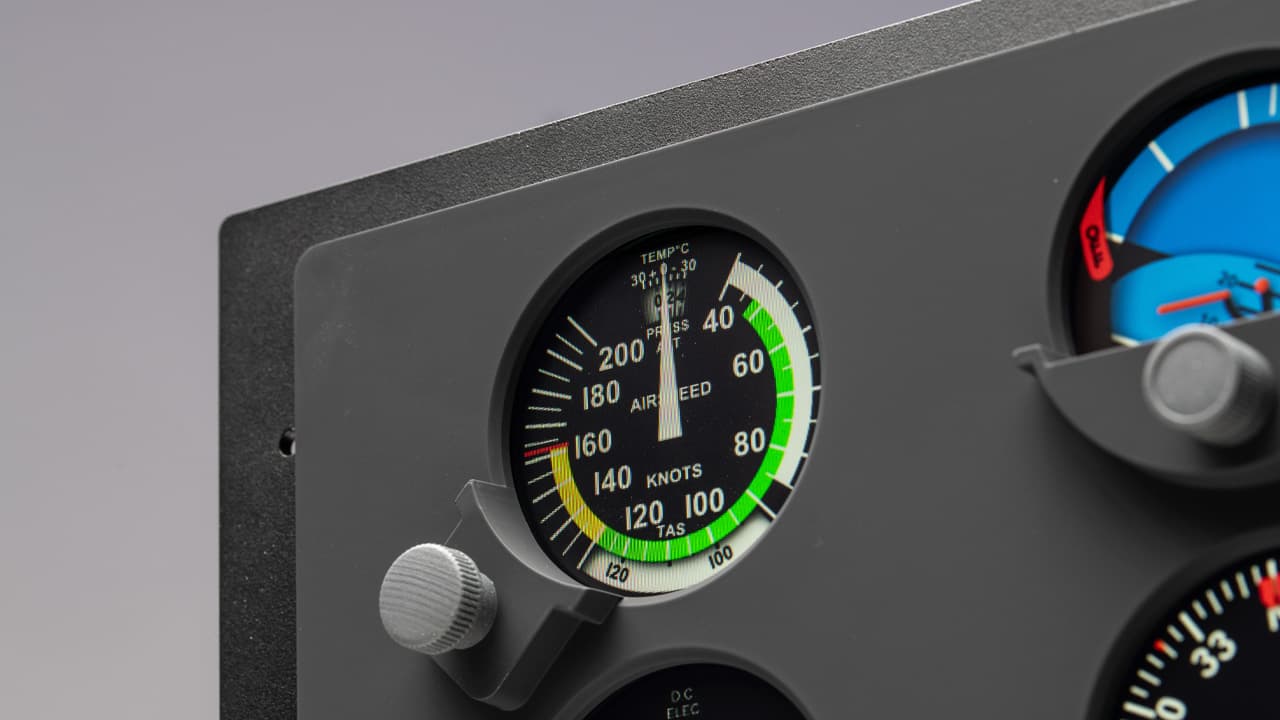
The FlightSimBuilder Steam Gauges panel is a plug-and-play nine-gauge instrument panel covering all the essentials — airspeed, altitude, attitude, heading, vertical speed, navigation, and RPM - with impressive build quality, rock-solid software stability, and genuinely good viewing angles for a physical cockpit setup at around $480 USD. The FlightSimBuilder Steam Gauges are a niche product for a specific type of simmer, particularly those building a traditional GA cockpit who want the tactile satisfaction of real physical dials and buttons that no touchscreen or VR setup can replicate. No native Mac support is a meaningful limitation and the gauges run about 20% smaller than real Cessna 172 instruments, but as a value play in the physical avionics space the FlightSimBuilder Steam Gauges panel is hard to argue with.
Pros
- Covers all nine essential steam gauges in one plug-and-play panel
- Genuinely impressive build quality for the price - buttons feel close to injection moulded despite being 3D printed
- FlightSimBuilder software is rock solid - no crashes or malfunctions in over a year of use
- New boost mode in updated software significantly improves responsiveness
- Excellent viewing angles - colour integrity maintained even from off-axis positions
- Clean front panel design with no visible screws
- Outstanding customer service backed up by consistently positive reviews
- Works seamlessly alongside other FlightSimBuilder products like the GNS 530
Cons
- At $480 USD it's not a cheap entry point for what is a fairly niche product
- No native Mac compatibility - Mac users need Air Manager as a workaround
- Gauges are around 20% smaller than real Cessna 172 instruments
- Minor latency on inputs - barely noticeable but present
- Screen resolution at 1024x768 shows slight pixelation up close
- Currently Windows only without workarounds
We’re diving into a brand-new product from Flights and Builder: the Steam Gauges Panel. This pack of gauges and dials is designed to enhance your flight simulation experience with Microsoft Flight Simulator and X-Plane on PC.
We’ll be unpacking this product, discussing the pricing, features, build quality, application value, and both the good and the bad points to help you determine if it’s worth your investment. Just to be transparent, FlightSimBuilder sent me the Steam Gauges panel for review purposes. However, everything shared here is entirely my own opinion.
Price
Let’s start with the price: this Steam Gauges panel retails for around $480 USD. Now, this may seem a bit steep, especially considering there are other options out there, like Air Manager. However, there’s no direct comparison, given the additional features, plug-and-play convenience, and build quality you’re getting here. So, hold off on your judgment of the price until the end of this review.Features and Compatibility
So, what can this little gem do? Currently, it works exclusively with Windows. To use it on a Mac, you’ll need to pair it with Air Manager. The panel comes with nine gauges: airspeed, altitude, attitude, turn coordinator, heading, vertical speed, two navigation gauges, and RPM—covering all the basics and then some.You’re looking at the default setup here, but there are customization possibilities using Air Manager, and FlightSimBuilder plans to release more configurations. The FlightSimBuilder software used to launch this panel is incredibly stable—I’ve never experienced a crash or malfunction in over a year of use. A new version with a “boost mode” promises less lag, making the unit much more responsive than older software versions.
Display Quality
The display operates at 60Hz, and the dials are smooth, although there is minor latency with the actual inputs, however its almost un-noticable. The screen resolution is 1024×768, similar to the original G1000 unit, but the gauges are about 20% smaller than standard dials found in a Cessna 172, for example. Despite the smaller size, the resolution is adequate for the price point, and the minor pixelation doesn’t detract from the overall experience. The lower resolution also helps your PC run the simulator more smoothly which is always a plus.Build Quality
The front panel features a nice, soft matte plastic finish. The rear has a hard plastic finish similar to the original G1000 unit. The panel includes standard HDMI and USB port, along with a power input at the back. The mounting system uses threaded inserts and screws on the tabs, keeping the front plate clean and screw-free.The buttons, likely 3D printed, are of exceptional quality, almost indistinguishable from injection-molded parts. They have a satisfying feel and audible click. The metal stand provides stability, with minimal movement when using the top click functions.
The build quality does align with the coast of the unit with a good amount of attention to detail with nice fit and finish on all the parts.
User Experience
Flying with the Steam Gauges panel has been a joy. Transitioning from a G1000 to steam gauges presents a rewarding challenge, engaging your brain differently. The gauges perform well for their price, with the VS (vertical speed) function being particularly satisfying. The viewing angles are excellent, maintaining color integrity even from different viewing angles—an often-overlooked but crucial feature if you have the unit mounted at the right height. There’s something about flying with physical buttons and dials that cannot be replicated in any other way.Final Thoughts
The Flights and Builder Steam Gauges panel is an excellent addition for anyone looking to create a more immersive, hands-on flight sim setup. It’s a niche product catering to a specific segment of the flight sim community, particularly those willing to invest for a more tactile experience. The physical interaction and tactile feedback it provides are unmatched by anything else you might be able to set up like touch screens or VR.Integrated seamlessly with FlightSimBuilder’s software, this panel is mostly plug-and-play, reliable, and supported by excellent customer service. If you already own their GNS 530, the Steam Gauges panel is a worthy addition to your setup. It offers a hands-on, immersive experience that truly enhances flight simulation.
Frequently Asked Questions
Affiliate Disclosure: Some links on this page are affiliate links. If you click and make a purchase, I may earn a small commission at no extra cost to you. I only recommend products I personally believe in.