FlightSimBuilder G1000 Review

Steve | G-LOC MEDIA
Flight simulation enthusiast and YouTuber
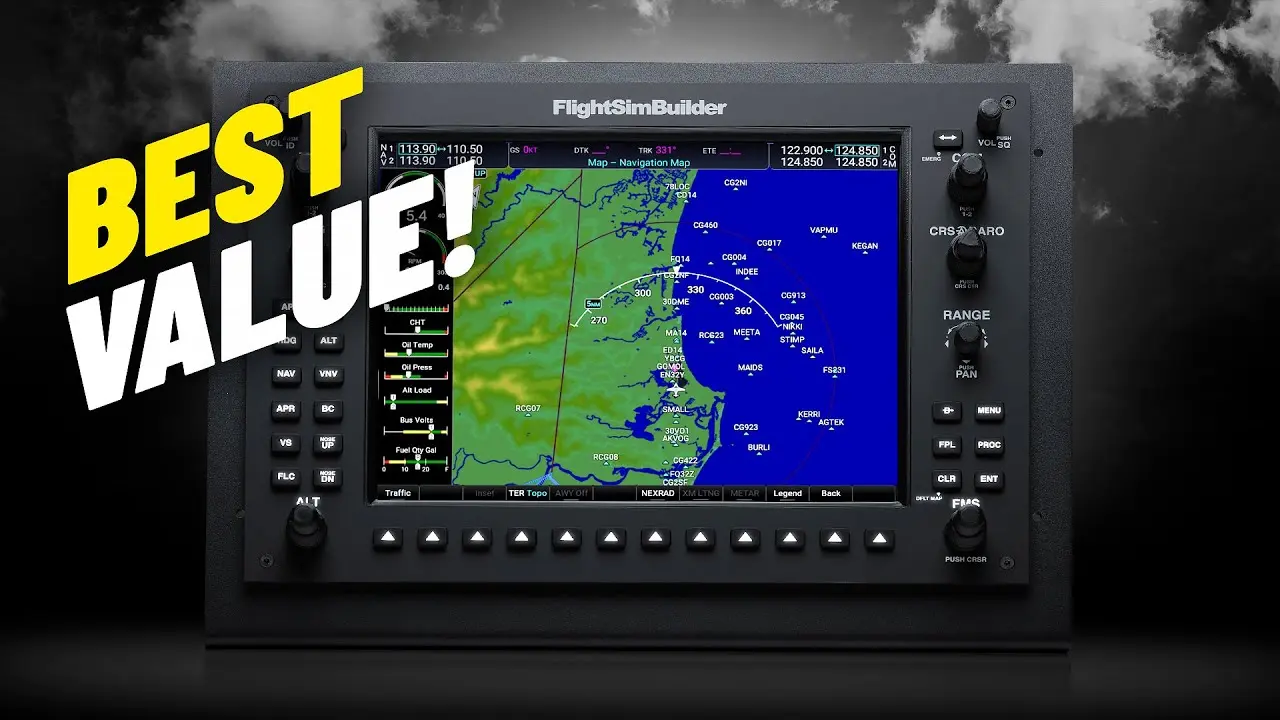
The FlightSimBuilder G1000 is the cheapest physical G1000 unit on the market at $650 - undercutting Real Sim Gear by almost 40% and Aviatek by nearly three times - and the build quality, screen clarity, and tactile feel are all significantly better than the price suggests. The 3D printed knobs are worth knowing about but genuinely well-executed, and the backlit soft keys are an absolute highlight. If you want to properly learn and use the G1000 rather than just click around a virtual screen with a mouse, this is the unit that will change the way you fly.
Pros
- Best value physical G1000 on the market at $650 - Real Sim Gear is 40% more, Aviatek nearly three times the price
- Backlit soft keys and autopilot buttons are an absolute highlight - great feel, great lighting, satisfying to press
- Matte screen finish - no glare or reflections even in a bright room
- 1280x768 resolution matches the real Garmin G1000 unit - looks crisp and clear at normal viewing distance
- Great viewing angles - no meaningful colour washout until well past 45 degrees
- 3D printed knobs are genuinely well executed - tactile, clicky, and better than you'd expect
- Simple and quick to get running in Microsoft Flight Simulator
- Everything just works - minimal latency on any of the inputs tested
- Outstanding customer service reputation - glowing reviews consistently mention support quality
- Transforms the way you learn and use the G1000 - builds muscle memory in a way clicking a screen never will
- Dramatically easier to use than trying to operate a virtual G1000 with a mouse
Cons
- Knobs and bezel surround are 3D printed - excellent quality but some people simply won't accept this at any price
- Metal stand bracket flexes slightly when pressing the top buttons - minor but noticeable
- Not hot swappable between PFD and MFD - you need to choose before loading the sim
- Microsoft Flight Simulator panel pop-out issues make setup more fiddly than it should be — not a FlightSimBuilder issue but affects the experience
- A single unit feels slightly unbalanced and awkward - two units is the better setup if budget allows
- Mostly locks you into G1000 equipped aircraft - limited flexibility for simmers who fly a wide variety of planes
- First time X-Plane setup is more involved than MSFS - not hard but not plug and play either
FlightSimBuilder G1000 Review — The Best Value Physical G1000 You Can Buy?
The FlightSimBuilder G1000 is the cheapest physical G1000 unit on the market right now, and that's exactly what makes it interesting. At $650 it sits well below the competition — the nearest rival, Real Sim Gear, comes in at almost 40% more, and the Aviatek G1000 is nearly three times the price. FlightSimBuilder did send this unit for review but as always this is completely my own take.First Impressions and Build Quality
Out of the box it looks pretty good. The matte finish plastic has a real nice touch to it and the overall build quality is higher than you might expect at this price point. The first thing you'll notice though is that some of the parts - mainly the knobs and the bezel surround around the screen - appear to be 3D printed.Now before you switch off - this is genuinely one of the better 3D prints I've seen. They feel nice to turn and dial in, with a satisfying tactile click and a great clicky sound. They're not quite as stiff as the Real Sim Gear unit but they're not far off. If you're someone who just won't accept 3D printed parts at any price that's worth knowing, but for most people it simply won't be an issue.
The absolute standout feature of the build is the backlit soft keys along the bottom and the autopilot keys on the left side. These are an absolute dream - they look great, the backlighting is excellent, and they have a stunning dull muted clunk when pressed. Easily one of my favourite parts of this whole unit.
The Screen
The screen has a matte finish which is genuinely important - no glare or reflections even in a bright room. It measures around 10.5 inches corner to corner with a 1280x768 resolution, which as far as I can tell matches the real Garmin G1000 unit exactly.You might think that sounds like a low resolution but at the distance you'll be sitting from it the screen looks super clear and crisp. The viewing angles also genuinely surprised me - you don't start to get any colour washout until you push well past 45 degrees, and that's completely normal. Screen runs at 60Hz and contrast and brightness levels are solid.
Software Setup
Getting it running is straightforward. The software downloads in seconds from the FlightSimBuilder website and getting it working with Microsoft Flight Simulator is simple — not quite plug and play on the very first run but close to it, and once it's configured you won't need to touch it again.Getting it running with X-Plane is a little more involved but the instructions on the website are clear and it's not hard.
Once you're up and running you'll decide whether to run the unit as a PFD (primary flight display — all your flight instruments) or an MFD (multi-function display - navigation, maps, charts, flight planning). You switch between them by pressing and holding a small button on the unit. Worth noting - it's not hot swappable. You need to choose before loading the sim, not during a flight.
Your computer will also see this as an additional monitor, so worth spending a couple of minutes setting that up in your display settings to suit your position.
One thing that's worth flagging - and this is a Microsoft Flight Simulator issue, not a FlightSimBuilder issue - MSFS made some recent updates that have made panel pop-outs more frustrating to work with. You used to be able to pop out a panel, drag it to the screen, hit Alt+Enter and get full screen. That process is now more fiddly. Pop Out Panel Manager can help but it's still not perfect. This will affect any brand of G1000 unit on MSFS so go in with that expectation set.
How Does It Change the Way You Fly?
This is the most important part of the whole review and honestly it's hard to fully describe until you've experienced it.The tactile feel of using a physical G1000 is genuinely satisfying in a way I didn't fully anticipate. It reduces the amount of reaching for the mouse, removes steps compared to using something like Air Manager, and makes inputting a flight plan significantly quicker and more intuitive. I found myself actually going through the full process of manually loading a flight plan into the G1000 just because it's enjoyable - something I'd never do clicking around on screen with a mouse.
The clarity advantage is also substantial. Being able to actually see and use the physical knobs and buttons compared to trying to click your way around a virtual G1000 on screen isn't a small improvement - it's dramatically easier and more natural.
The biggest unexpected benefit for me has been the learning aspect. Having the physical unit has pushed me to actually learn and use more of the G1000 than I ever would have otherwise. It's intuitive to tinker with and the muscle memory you build just doesn't happen the same way when you're hunting around a screen with a mouse. If you're doing real world flight training with a G1000 aircraft this is an absolute no-brainer addition to your setup.
The one genuine limitation is that you'll mostly be flying G1000 equipped aircraft - Cessnas, Bonanzas and similar. You can technically pop out any screen to the unit and reconfigure buttons if you want to go deep, but most people will naturally gravitate toward the G1000 planes and stay there.
One more thing — using a single unit felt a little bit unbalanced and awkward. If budget allows, two units running as a PFD and MFD together is a significantly better setup and the way this is really designed to be used.
Price and Value
At $650 the FlightSimBuilder G1000 is the best value physical G1000 on the market right now by a clear margin. Real Sim Gear is almost 40% more expensive, and Aviatek nearly three times the price. For the functionality, the build quality, and the experience it delivers, the value is hard to argue with.Who Is the FlightSimBuilder G1000 For?
Buy it if:
- You're doing real world flight training on a G1000 equipped aircraft — absolute no-brainer
- You want to properly learn ILS procedures, charts, and G1000 navigation in the sim
- You want two units running as PFD and MFD for a complete setup
- You want the best value physical G1000 available right now
Look elsewhere if:
- You just want something to look at on the screen without actually using the inputs — a 12-13 inch touchscreen would be a cheaper option for that
- You fly a wide variety of aircraft beyond G1000 equipped planes
- 3D printed knobs are a deal-breaker for you at any price
Final Verdict
The FlightSimBuilder G1000 is a great rendition of the Garmin unit and genuinely something you don't know you need until you have one. The tactile feel, the learning it enables, the situational awareness improvement, the customer support reputation, and the price point all add up to a product that's very easy to recommend. No VR headset can replace that physical tactile feeling and the muscle memory that comes with it. At $650 it's the best bang for buck G1000 you can get your hands on right now.Affiliate Disclosure: Some links on this page are affiliate links. If you click and make a purchase, I may earn a small commission at no extra cost to you. I only recommend products I personally believe in.