FlightSimBuilder TNXi G1000 Review

Steve | G-LOC MEDIA
Flight simulation enthusiast and YouTuber
The Flight Sim Builder G1000 TNXi is the most affordable physical G1000 unit on the market right now, undercutting competitors like Real Sim Gear and Aviatek by $250 or more while delivering surprisingly similar performance. The build quality is a genuine step up from the original, though there are some inconsistencies with backlight bleed and the touch version's glossy screen can be a pain in bright rooms. It's a solid buy if you've already decided you want physical avionics hardware, just go in with realistic expectations and ideally budget for two units rather than one.
Pros
- Great value and best price on the market
- Build quality is almost as good as other more expensive G1000's
- Easy software
- Physical buttons make a great experience in the sim
- Customer service seems to be superb
- Rubberized buttons are beautiful
- TNXi version opens the gates to more planes
Cons
- Glossy displays on the TNXi version are not my favourite
- Backlighting while good it can be a bit hit and miss
- Although its the cheapest you can get. It's still a hefty investment
What Makes the G1000 TNXi Different
Flight simulation enthusiasts are always looking for the next upgrade to enhance their cockpit experience. The Flight Sim Builder G1000 TNXi promises to be more than just another G1000 replica – but does it deliver? After several weeks of testing, I’m sharing my honest assessment of what works well and what might give you pause.
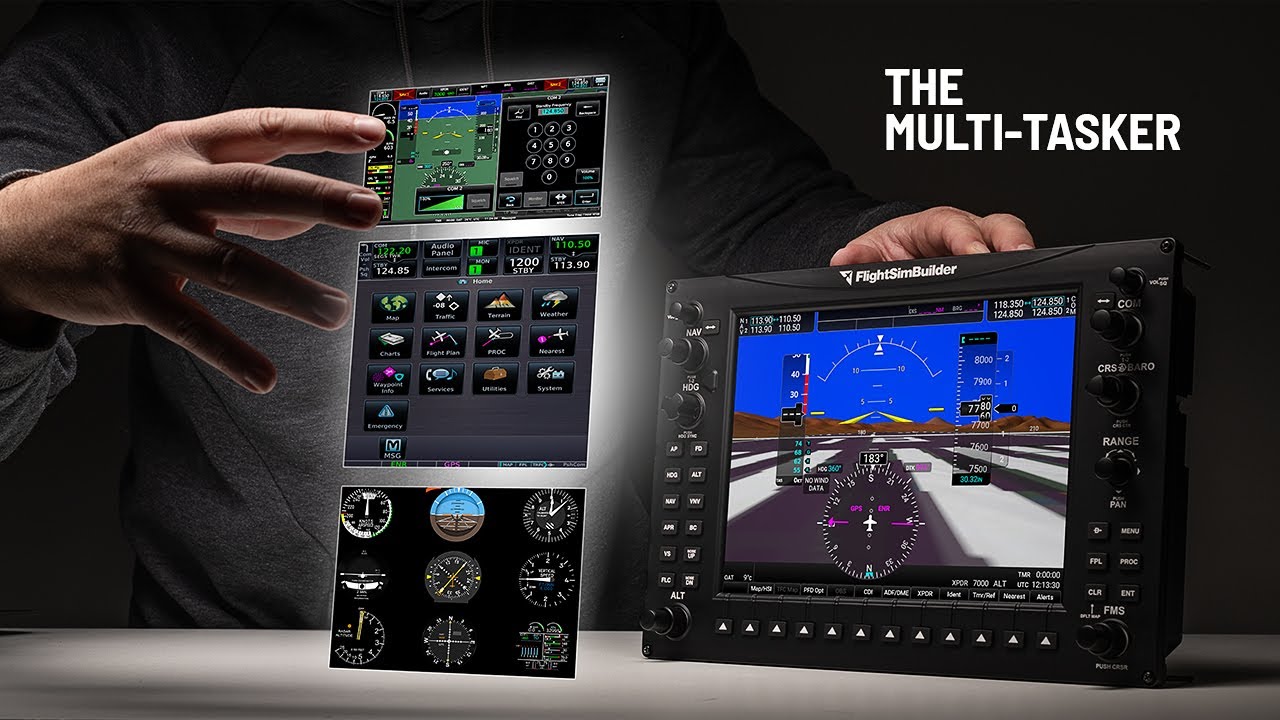
The G1000 TNXi attempts to go beyond standard G1000 replication by functioning as a multi-purpose avionics suite. This approach unlocks various aircraft types in your simulator, which could be valuable for pilots who enjoy flying different aircraft without constantly reconfiguring their setup.
Two Versions: Understanding Your Options
Flight Sim Builder offers two versions, and the differences have real implications for your investment:Touch Version ($850 USD):
- Full G1000 functionality
- Steam gauge compatibility
- G3X Touch capability
- Upcoming G600 support
- GTN750 compatibility (with additional TDSSim add-on)
- Glossy screen with potential reflection issues
Non-Touch Version ($750 USD):
- G1000 replication
- Steam gauge compatibility
- Matte display (better for bright environments)
- Limited to core functions
- No access to touch-specific avionics
Build Quality: Significant Improvements with Some Trade-offs
The TNXi shows meaningful upgrades from Flight Sim Builder’s original G1000, though it’s not without compromises.What’s Improved
The move to injection-molded components represents a substantial upgrade from the previous 3D printed parts. The overall construction feels more premium, and the tactile feedback on knobs maintains that satisfying click that sim pilots appreciate.The comprehensive backlighting is a welcome addition, creating a more authentic night time flying experience. The soft keys remain excellent with their bright illumination, now enhanced with a subtle end-of-travel click.
Areas of Concern
The displays support 75Hz at 1024×800 resolution, which closely matches real Garmin specifications and looks sharp at normal viewing distances. However, there are some quality consistency issues worth noting.Both test units showed varying amounts of edge backlight bleed in different areas. While it’s barely noticeable during normal operation, it’s present. Additionally, the backlighting isn’t perfectly even across the panel, with some LED placement variance between units.
The glossy screens on the touch version could be problematic in bright environments. Flight Sim Builder acknowledges this as a current technology limitation, but it’s something you’ll need to live with if you choose the touch version.
Software Integration: Mostly Straightforward
Setup is generally plug-and-play, which is refreshing in the flight sim hardware world.Microsoft Flight Simulator integration works well out of the box, though touch functionality requires additional software (Popout Panel Manager) to work properly – an extra step that some users might find annoying.
X-Plane users will need to modify G1000 textures to remove bezels from pop-outs. While this is documented, it’s an additional configuration step that not everyone will want to tackle.
The TDSSim GTN750 Add-On: Expensive but Impressive
The $75 USD TDSSim GTNXi add-on is genuinely excellent, providing one of the most intuitive avionics experiences available for simulation. The Navigraph integration is particularly well-executed.However, this brings your total investment to $925 for the full touch experience – a significant jump from the base price that’s worth factoring into your decision.
Competitive Analysis: Great Value with Caveats
Comparing the TNXi to established competitors reveals both strengths and weaknesses:- Flight Sim Builder G1000 TNXi (Non-Touch): $750 USD
- Real Sim Gear G1000: $1,000 USD
- Aviatek G1000: $1,000 USD
- Desktop Pilot G1000: $975 USD
The TNXi is clearly the most affordable option by a long way. Having used the Real Sim Gear unit, I can confirm the TNXi performs similarly in most respects. Flight Sim Builder has better soft keys, while Real Sim Gear offers superior rotational knob feel and more consistent backlighting.
The $250+ price difference makes the TNXi attractive compared to any of the other G1000 units.
Touch vs Non-Touch: Consider Your Priorities
The Non-Touch Version Makes Sense If:
- You primarily fly G1000-equipped aircraft
- You’re budget-conscious
- You prefer matte displays
- You don’t need the flexibility of multiple avionics types
The Touch Version Is Worth Considering If:
- You enjoy flying various aircraft types
- The additional $100 investment fits your budget comfortably
- You’re willing to accept glossy screen reflections
- You’re interested in the GTN750 add-on
The Fundamental Question: Do You Need Physical Hardware?
Before considering which version to buy, ask whether you need physical G1000 units at all. These devices serve one primary purpose: providing tactile interaction that you can’t get from screen-based solutions.If you’re not specifically seeking that hands-on experience, alternatives like tablet displays with Air Manager and a knobster can provide similar functionality at lower cost. The physical units only make sense if you’re genuinely craving authentic tactile feedback.
Single vs Dual Unit Considerations
Based on testing both configurations, I’d recommend either purchasing two units or reconsidering the investment entirely. A single physical unit paired with screen-based displays creates an inconsistent experience that can be more frustrating than immersive.The exception is single-screen aircraft like those using G3X configurations, where one unit works perfectly.
Final Assessment: Solid but Not Perfect
The Flight Sim Builder G1000 TNXi represents a meaningful improvement over the original model. The build quality upgrades are genuine, the software is stable, and the price point remains competitive.However, it’s not without compromises. The display quality inconsistencies, glossy screen reflections on the touch version, and the additional software requirements for full functionality are real considerations.
The Bottom Line: If you’re committed to physical avionics hardware and understand both the benefits and limitations, the TNXi offers good value in the current market. Just ensure you’re making this investment for the right reasons – that authentic tactile experience – rather than expecting it to fundamentally transform your simulation experience.
The TNXi is a solid choice for enthusiasts who’ve already decided they want physical G1000 hardware, but it’s not necessarily going to convert skeptics who are happy with screen-based solutions.
Frequently Asked Questions
Affiliate Disclosure: Some links on this page are affiliate links. If you click and make a purchase, I may earn a small commission at no extra cost to you. I only recommend products I personally believe in.