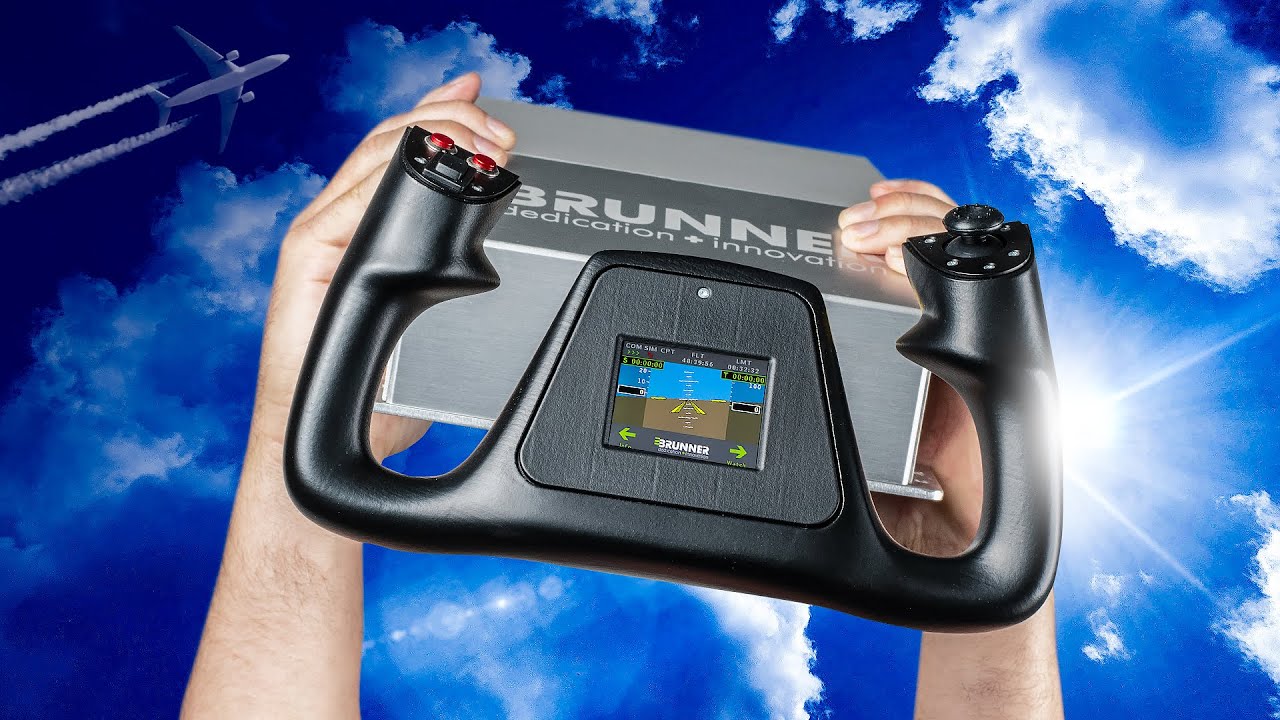
Brunner CLS-E MK II Yoke Review

Steve | G-LOC MEDIA
Flight simulation enthusiast and YouTuber
The Brunner CLS-E MK II Yoke is the most immersive force feedback yoke available for flight simulation right now - 160mm of pitch travel, airspeed-dependent resistance, trim effects that will genuinely change the way you fly, and build quality that after months of heavy use still feels brand new. At around $2,300 USD it's not for everyone and the software takes time to dial in, but for the serious flight sim enthusiast who wants the absolute best the value stacks up in a way that's hard to argue with. If you've never flown with a force feedback yoke before, get your hands on one at a flight sim event and you'll know within 60 seconds whether this is for you.
Pros
- Most convincing force feedback experience available in any flight sim yoke
- 160mm of pitch travel, one of the longest throws of any yoke on the market
- Trim effects are a genuine game changer and the best reason to buy a force feedback yoke
- Airspeed dependent resistance feels completely realistic at every speed
- Turbulence, prop wash, stick shaker and engine vibration all brilliantly executed
- Exceptional build quality that still feels brand new after 100+ days of heavy use
- Completely silent in operation
- Extremely configurable software with deep profile customisation per aircraft
Cons
- Very expensive at around $2,300 USD plus shipping and potential import taxes
- Massive footprint at 43cm long, may not fit standard cockpit rigs without a custom deck
- Screw mount only, no desk clamp option
- Software has a steep learning curve and takes real time to dial in properly
- No power switch on the unit
- Yoke wheel is 15-20% smaller than the real aircraft yoke it is modelled on
- Yoke wheel is not interchangeable
- Not plug and play, expect to invest time building profiles for each aircraft
Brunner CLS-E MK II Yoke Review - The Best Force Feedback Yoke for Flight Sim?
After spending over three months flying with the Brunner CLS-E MK II Yoke I can tell you this - it sits at the very top of the tree when it comes to force feedback yokes for flight simulation. The features, the build quality, and the flying experience are all in a class of their own. Brunner did send this unit for review but as always they've had zero input in what I think and they didn't see this video before it went live.Key Specs and Features
The Brunner CLS-E MK II delivers 110 Newtons of maximum pitch force and 6 Newton metres of roll force. Both are more than enough for anything you're realistically going to encounter in a flight simulator - in fact I run mine fairly low across the board because the power on tap is substantial.But here's the thing - raw force output isn't actually the main event with this yoke. The real story is the resolution and the range of that force delivery, and that becomes very obvious when you compare it to the CLS-E NG, which is Brunner's entry-level force feedback yoke.
Pitch and Roll Travel:
Roll travel: 180 degrees — standard, same as a real GA yoke
Pitch travel: 160mm — one of the longest throws of any flight sim yoke available and close to what you'd experience in a real GA aircraft like a Cessna or TBM. That pitch travel is a genuinely big deal and we'll come back to why shortly.
Force Feedback Effects:
- Airspeed resistance - the yoke gets progressively heavier as speed increases
- Turbulence effects
- Engine vibration
- Prop wash
- Trim effects - an absolute game changer
- Stick shaker effects
There's also a small flight display built into the yoke handle itself. It cycles through instrument display, stopwatch, button configs, telemetry data, and an information page. Honestly I don't use it a huge amount in normal flying but for anyone using this for real-world pilot training the stopwatch and instrument pages could be genuinely useful.
What It's Like to Actually Fly With It
This is the part that words struggle to fully capture. The moment you lift off the tarmac the yoke comes alive. At low airspeeds it has a light, almost dead feeling - exactly like a real aircraft where there's minimal airflow over the control surfaces. As speed builds the resistance increases progressively and at 160-200 knots banking the aircraft requires real, substantial effort. It just feels right in a way that no other yoke I've used comes close to replicating.Turbulence is equally impressive. Set severe turbulence in X-Plane and the yoke is genuinely being thrown around - it's almost too much. Dial it back to moderate and it becomes one of the most immersive flying experiences you can have in a home simulator. The prop wash effect on the ground when you push the throttle up is also a brilliant touch - you can feel the airflow from the propeller coming through the yoke before you even start moving.
Stall behaviour is remarkable. As speed bleeds off the yoke gets progressively lighter and more dead in your hands, the stick shaker fires, and recovery requires that immediate nose-down input. It's as close to the real sensation of stall recovery as a home simulator is currently capable of delivering. This comes from a friend who is indeed a real pilot.
The Trim Effect - The Real Reason to Buy a Force Feedback Yoke
I cannot overstate this. Being able to trim out using pressure — feeling the yoke resistance change as you adjust the trim wheel and the aircraft settles into equilibrium — has completely transformed the way I fly in the sim. It sounds like a small thing. It absolutely is not. Every single person I've spoken to who owns a Brunner force feedback yoke says the same thing about the trim effects. It's the number one reason above all else to consider a force feedback yoke and the Brunner CLS-E MK II does it better than anything else available.Autopilot is also a highlight — engage it and you can watch the yoke moving on its own, responding to heading changes in real time. It never gets old.
X-Plane edges out Microsoft Flight Simulator slightly in terms of how the yoke feels, which I think comes down to the flight model. In X-Plane at its best you can almost feel the air rushing over the wing through the yoke. It's extraordinary.
Design and Build Quality
The Brunner CLS-E MK II Yoke is a serious piece of equipment and it looks and feels like one. The raw exposed metal finish looks a bit unfinished in photos on the website but in person it's a different story entirely - it's an industrial beast with genuinely exceptional build quality. After over 100 days of heavy use it still operates and feels exactly like it did out of the box. No rattles, no squeaks, nothing loose, still completely silent.Important - measure your space before buying. The base is 21cm wide and a whopping 43cm long. This can be a problem on standard cockpit rigs like the Next Level Racing Flight Sim Pro. The solution is a custom deck like the one I built, which also lets you screw it down properly — unfortunately the only real mounting option available.
The Yoke Handle:
The yoke wheel is made from what feels like a soft, premium hard rubber - noticeably more premium than the NG yoke. It has the built-in display in the centre. Two things worth mentioning though - the wheel is around 15-20% smaller than the real aircraft yoke it's modelled on, and you can't interchange the yoke wheel. At this price point I'd love to see swappable wheels like you get on high-end sim racing wheel bases. Both are nitpicks but they're worth noting given what this costs.Software
The CLS2Sim software is where the experience gets a bit more complex. It's extremely configurable — almost to the point of being overwhelming. There's a documentation guide online that explains all the settings but it's not immediately obvious it exists and the UI isn't the most intuitive.Getting it dialled in for each aircraft takes time and patience. The good news is that once you've built and saved a profile for a specific aircraft you can set it to autoload whenever you fly that plane - so the ongoing maintenance is minimal. But if you struggle with technical tinkering, budget some time for the initial setup.
Compatibility with both X-Plane and Microsoft Flight Simulator is seamless once configured.
One practical gripe - there's no power switch on the unit. A small thing but genuinely annoying when you just want to quickly turn it off.
Price
There's no softening this - the Brunner CLS-E MK II Yoke is expensive. At around €2,170 — approximately $2,300 USD plus shipping and potential import taxes - it's one of the most expensive flight sim yokes on the market and it will be out of reach for most simmers.Is it worth it? That entirely depends on what you value. If you're a hardcore flight sim enthusiast who wants the absolute best and values an immersive, realistic force feedback experience above everything else — yes, the value stacks up. If you're a casual simmer this simply isn't the right product.
The comparison to sim racing is worth making here. In sim racing there are strong force feedback options at multiple price tiers from budget to premium. In flight sim the market is much smaller and the jump from mid-range to high-end is enormous. That's why the price can feel jarring - but it reflects the reality of a niche market rather than anything wrong with the product itself.
If the 160mm of pitch travel is what draws you in, the MK II is worth the extra cost over the NG. If pitch travel doesn't excite you that much and you just want force feedback, the cheaper CLS-E NG gets you most of the way there for significantly less money.
Who Is the Brunner CLS-E MK II Yoke For?
Buy it if:
- You're a serious, passionate flight sim enthusiast who wants the absolute best force feedback experience available
- The 160mm of pitch travel genuinely excites you - it should, it's extraordinary
- You're a real-world pilot using the sim to stay current and want controls that feel as authentic as possible
- You love the technical side of sim building and enjoy dialling in profiles
- Budget isn't your primary concern - you want the best and you're willing to pay for it
Look elsewhere if:
- You're a casual simmer - the value proposition simply doesn't stack up for occasional use
- You want something plug and play without any configuration time
- The 160mm pitch travel doesn't particularly matter to you - the CLS-E NG is significantly cheaper and still excellent
- Software complexity is a concern - this will require time and patience to get dialled in properly
Final Verdict
The Brunner CLS-E MK II is not a toy. It's a precision piece of flight simulation equipment that will completely transform your sim if you're the right person for it. The force feedback effects - particularly the trim, the airspeed resistance, and the turbulence - are in a class of their own. The build quality after months of heavy use is still impeccable. The flying experience when the profile is dialled in is genuinely addictive in a way that's hard to describe until you've felt it.Every person I've spoken to who owns one says the same thing - I could never go back to a normal yoke. After 100+ days with it I'm firmly in that camp.
Expensive? Absolutely. Worth it for the right person? Without question.
Frequently Asked Questions
Affiliate Disclosure: Some links on this page are affiliate links. If you click and make a purchase, I may earn a small commission at no extra cost to you. I only recommend products I personally believe in.